Rate Limiting: The API Guard You Cannot Ship Without
An unprotected API endpoint is an open invitation to abuse, from scrapers and bots to cascading backend overload. Rate limiting enforces per-client quotas with token buckets and sliding windows, shielding services from runaway automation and thundering-herd failures.
Jonathan MukhobeAI and ML Engineer
Rate Limiting and Throttling on API Endpoints
An unprotected API endpoint is an open invitation to abuse, from scrapers and bots to cascading backend overload. Understanding how rate limiting and throttling work is non-negotiable for any backend engineer shipping production systems.
Rate Limiting vs Throttling
Think of an API as a highway. Rate limiting is a hard barrier, a toll gate that only lets through a fixed number of cars per hour, then turns the rest away entirely. Throttling is a speed bump: it does not block anyone, it just slows the convoy down to a manageable pace.
Both protect your system, but they are different philosophies. Rate limiting enforces a quota; throttling manages flow.
Rate Limiting
Setting a cap on the number of requests a client or user can make within a specific time window (e.g. 1,000 requests per minute per user). If a client tries to exceed this limit, they get blocked or receive an error response, typically a 429 Too Many Requests status code with a Retry-After header. This ensures no single source overwhelms the system. You can apply limits at different scopes:
- Per-user: each user gets 1,000 requests per minute, preventing one bad actor from ruining others.
- Per-application: the entire service handles 50,000 requests per minute, protecting the whole system.
- Per-endpoint: stricter limits on expensive endpoints (e.g. /generate-report gets 10/min, /health gets unlimited).
- Per-tier: free users get 100/hour, paid users get 10,000/hour. This is the classic SaaS model. Rate limiting is ideal when you want to enforce strict usage policies. It is straightforward: you hit the cap, you get denied.
Throttling
Throttling is about slowing down the rate of requests rather than outright rejecting them. It is useful when you want to maintain service availability but need to manage load more gracefully. If an API is handling more requests than usual, you can queue requests and process them at a steady rate instead of rejecting them. The user might see increased latency, but they are not blocked outright. Throttling does not say "you cannot," it says "wait your turn." Your client experiences latency but eventually gets a response.
- Dynamic throttling: adjusts levels based on real-time metrics like CPU load, memory usage, or queue depth. When your server is at 90% CPU, you slow the drain on the queue. When it drops to 40%, you speed back up.
- Adaptive throttling: takes this further by using heuristics or ML to predict spikes before they hit. If every Monday at 9am traffic triples, an adaptive system starts throttling at 8:55am, before the wave arrives.
Often systems implement both: first try throttling, then move on to rate limiting if capacity is threatened.
The Two Core Algorithms
Token Bucket (Rate Limiting)
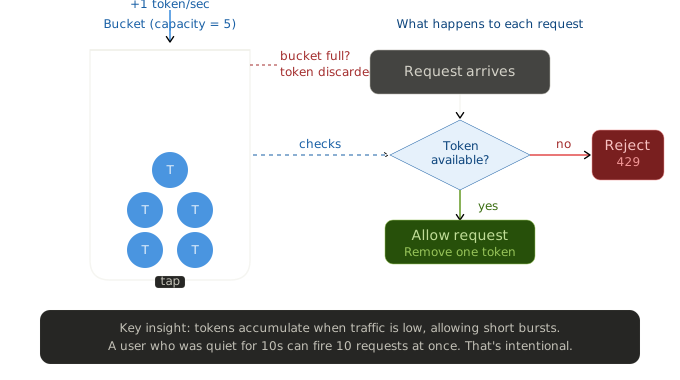
This is the most widely used algorithm for rate limiting. Imagine a bucket that holds tokens, where each token represents permission to make one request. Tokens are added to the bucket at a fixed rate, and if the bucket is full, extra tokens are discarded. When a request comes in, the program checks the bucket: if a token is available, the request is allowed and a token is removed. If the bucket is empty, the request is denied.
The token bucket is great for rate limiting because it naturally handles bursty traffic. A user who makes no requests for 30 seconds builds up a reserve of tokens. When they need to fire a batch of requests, they can. This is more fair and realistic than a rigid counter.
In practice (e.g. in Redis), you store two values per user: tokens_remaining and last_refill_timestamp. On each request, you calculate how many tokens to add since the last refill, clamp to max capacity, then check if there is a token to consume.
Leaky Bucket (Throttling)
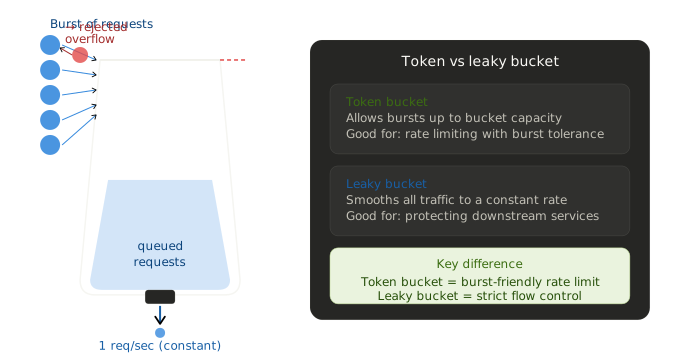
The leaky bucket solves a different problem: smoothing out a burst rather than capping it. Imagine a bucket that leaks water at a constant rate. When a request comes in, it is treated like adding water to the bucket. If the bucket is not full, the request is allowed and a bit of water is added. If the bucket is full, the request is delayed or rejected. The bucket ensures that requests are processed at a smooth constant pace, even if lots arrive at once.
The leaky bucket is ideal when you are calling a downstream service that can only handle a steady rate: a payment processor, a third-party API with strict SLAs, or a legacy backend. You absorb the burst, then deliver requests calmly. Your client waits a bit, but the downstream service stays healthy.
The Full Implementation Picture
Systems often layer both approaches: throttle first to queue the burst, then rate limit to reject genuinely excessive clients. Here is what that looks like end-to-end:
Cloudflare (Domain Layer)
This is the first and cheapest line of defense. You can block entire IP ranges before the request even touches your servers. Configure rate limiting rules under Security in the Cloudflare dashboard: for example, "block IPs that make more than 500 requests per minute to /api/*." This costs nothing in compute and handles volumetric attacks and bot traffic before they reach your backend. Enabling Bot Fight Mode handles a huge class of abusive traffic automatically.
Vercel (Frontend/Edge Layer)
Vercel's Edge Middleware runs before your React app and is a great place to rate limit session-based requests or SSR routes. You can write middleware that checks a counter in an edge KV store. For most React apps, you will rely on the backend for heavy rate limiting.
FastAPI (Main Enforcement Layer)
Use slowapi, the FastAPI equivalent of Express Rate Limit. You can apply per-IP limits globally or set stricter per-endpoint limits for expensive operations like report generation. For user-based limits (not just IP), swap the key function to extract the user ID from your JWT.
Django REST Framework
DRF has built-in throttling via AnonRateThrottle and UserRateThrottle. You configure default rates in settings.py or create per-view throttle classes for endpoint-specific limits. DRF uses a leaky bucket-style algorithm internally, which is great for throttling.
Redis (Shared State Across Instances)
The moment you scale to more than one instance, in-memory rate limiting breaks: each instance has its own counter and they do not talk to each other. Redis solves this. Add a Redis instance and point both slowapi and DRF at it. Both libraries support Redis backends directly, keeping your counters consistent across every running instance.
Rate limiting sits alongside load balancing: one caps what a client may ask for, the other spreads what gets through.
Monitor and Tune
Set up alerts on your 429 rate. If it spikes, you might be too aggressive (blocking legitimate users) or too loose (absorbing abuse). Track these metrics:
- 4xx error rate, filtered to 429s.
- P95/P99 latency (throttling shows up here before errors do).
- Queue depth if you are using any async processing.
- Per-user request rates to spot abusers.
For metrics, Railway's built-in observability dashboard is a start, but for production you will want to push to Datadog or use a lightweight option like Prometheus and Grafana.
Quick Decision Guide
| Situation | Use |
|---|---|
| Free vs paid tier quotas | Rate limiting (token bucket) |
| Protecting a slow downstream API | Throttling (leaky bucket) |
| DDoS / bot traffic | Cloudflare rate limiting (IP-level) |
| Single-instance app | In-memory (slowapi default) |
| Multi-instance on Railway | Redis-backed rate limiter |
| Expensive endpoints (AI, reports) | Per-endpoint stricter limits |
| Prefer user experience over strictness | Throttle first, rate limit as fallback |
The general rule: Cloudflare handles the perimeter, FastAPI or Django handles business logic limits, and Redis keeps state consistent when you scale.