Load Balancing at Scale: Strategies That Keep Systems Alive
A single overloaded server is a single point of failure. Load balancing distributes traffic across a fleet, enabling horizontal scaling, zero-downtime deployments and automatic failover. Round-robin, least-connections and consistent hashing are non-negotiable knowledge at scale.
Jonathan MukhobeAI and ML Engineer
What Is Load Balancing?
At its core, load balancing is the practice of distributing incoming network traffic across multiple servers so that no single server becomes overwhelmed. Think of it like a supermarket with multiple checkout lanes: instead of everyone queuing at one cashier, a manager directs customers to whichever lane is shortest. The customers get served faster, and no cashier burns out.
For example, when a user hits a React app and then a Django API, something has to decide which server instance handles that request. That "something" is a load balancer.
Why it matters: A single server has a ceiling, in terms of CPU, RAM, and network bandwidth. Load balancers let you scale horizontally (add more servers) rather than just vertically (buy a bigger server). They also give you redundancy: if one server crashes, traffic is automatically rerouted to the healthy ones.
Types of Load Balancers
There are three broad categories, each with different trade-offs in cost, control, and capability.
Hardware Load Balancers
Physical appliances from vendors like F5 or Citrix. They are extremely fast (purpose-built silicon), handle millions of connections, and are found in large banks and telecoms. The downside: they are expensive (tens of thousands of dollars), inflexible, and hard to scale. As a developer building web apps, you will almost certainly never touch one of these.
Software Load Balancers
Programs running on commodity hardware or VMs. NGINX, HAProxy, and Envoy are the big names. You get full control, they are cheap, and they are extraordinarily configurable. The trade-off is that you are responsible for running and scaling the software itself.
Cloud-Based Load Balancers
Managed services like AWS ALB, Cloudflare Load Balancing, and GCP Cloud Load Balancing. You configure them via a dashboard or API and the provider handles everything else. This is the most relevant category for a modern web developer stack.
Load Balancer Classification by OSI Layer
Load balancers do not all operate at the same level of the network stack, and the layer they operate at determines what information they can use to make routing decisions.
Layer 4 (Transport)
The load balancer sees the IP address, port, and whether it is a TCP or UDP connection, but it never opens the packet and reads what is inside. Think of it like a postal sorting facility that routes parcels by zip code, without opening them. It is extremely fast because the inspection is minimal.
Good for: raw TCP traffic, non-HTTP protocols (like databases, game servers, MQTT), and situations where you need maximum throughput.
Layer 7 (Application)
The load balancer actually reads the HTTP request: the URL, headers, cookies, even the body. Now it can make smart decisions. Route /api/* requests to your Django servers, / to your React build, and /uploads/* to object storage. Route requests with a specific session cookie to the same server that created that session. This is what Cloudflare, Vercel, and most modern cloud load balancers do.
Global Server Load Balancing (GSLB)
This operates above both L4 and L7. Instead of routing requests between servers in one location, a GSLB routes users to the right data center (or region) before any L4/L7 load balancing even begins. Two mechanisms power this:
- DNS-based routing: When a user queries a domain, the DNS server returns a different IP based on where the user is. A user in Kampala gets the IP of the closest data center; a user in Berlin gets a different one. Cloudflare's Load Balancing product does exactly this.
- Anycast networking: Multiple servers worldwide advertise the same IP address. Internet routing protocols (BGP) automatically direct each user's traffic to the topologically nearest server. Cloudflare's entire network runs on Anycast, which is why Cloudflare is so fast globally.
Load Balancing Algorithms
Once traffic arrives at a load balancer, it needs to decide which server gets each request. Here are the main algorithms:
Round Robin
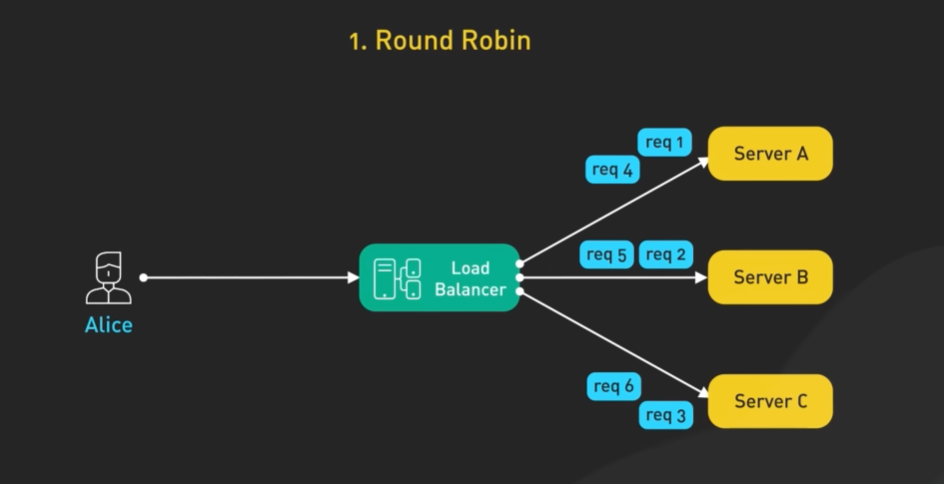
Here, servers get requests in a sequential order i.e the first request goes to server 1, then the next request to server 2, and the third to server 3, then the next request back to server 1, so requests go to servers in a fixed cycle: 1, 2, 3, 1, 2, 3. It works when all your servers are identical(have the same capabilities) and requests take similar time. Simple and predictable.
Sticky Round Robin (Sessions)
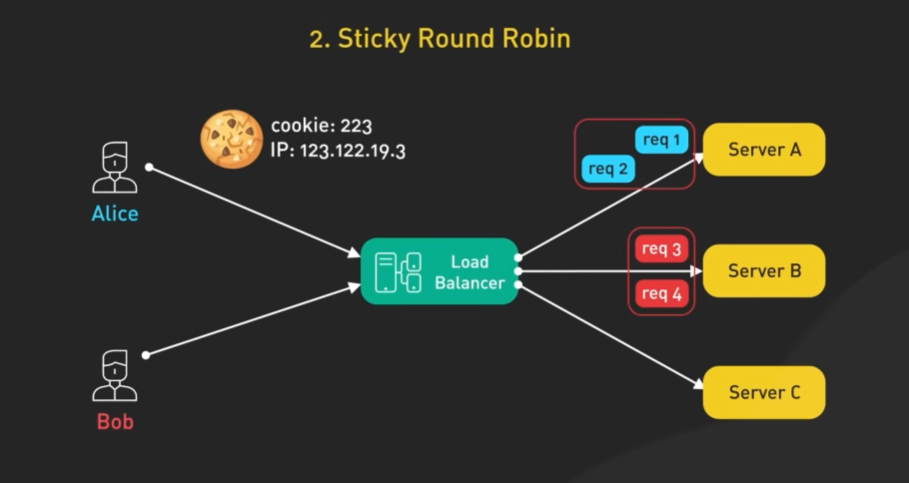
Same as round robin, but once a client is assigned a server, all their requests go to that same server via a cookie or IP. Great for stateful apps that store sessions in memory. If your Django app stores session data in memory (not Redis), a user who gets routed to Server 2 for login must keep going to Server 2, or their session disappears. Sticky sessions handle this, though the better long-term solution is externalizing sessions to Redis.
IP/URL Hash (Deterministic)
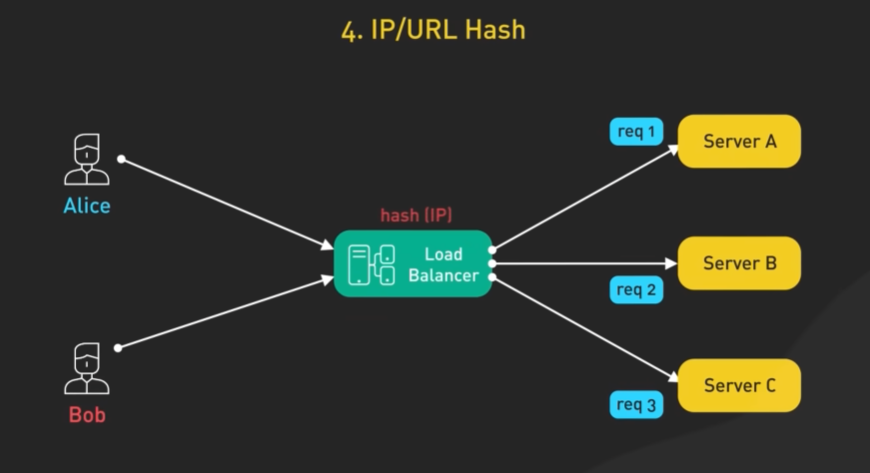
A hash of the client's IP (or the URL) determines the server. This algorithm determines which server gets a request based on the hash of the client's IP address, for example, if client 1 makes a request to the load balancer, the load balancer uses the client's IP address, hashes it and sends the request to an appropriate server, and all future requests made by that client are redirected to tha same server by the load balancer using the IP hashing algorithm. This is useful when you want the client to consistently connect to the same server.The same input always maps to the same server. Good for caching (cache locality stays on one server), but problematic if one IP generates massive traffic (such as a mobile carrier NAT-ing thousands of users behind one IP).
Least Connections (Dynamic)
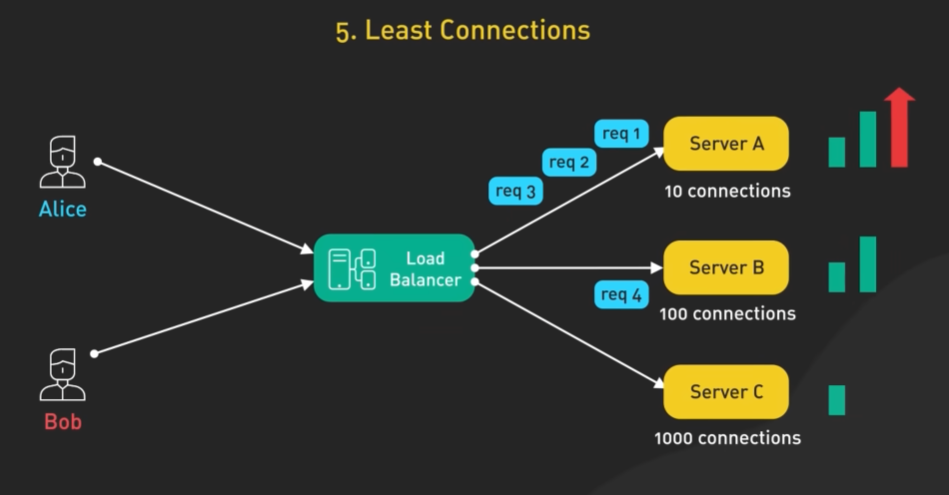
Each new request goes to whichever server currently has the fewest active connections. Like joining the shortest queue at a theme park ride. Excellent for requests with variable processing time. If some requests take 5ms and others take 5 seconds, you do not want servers getting buried while others sit idle. This algorithm prevents that.
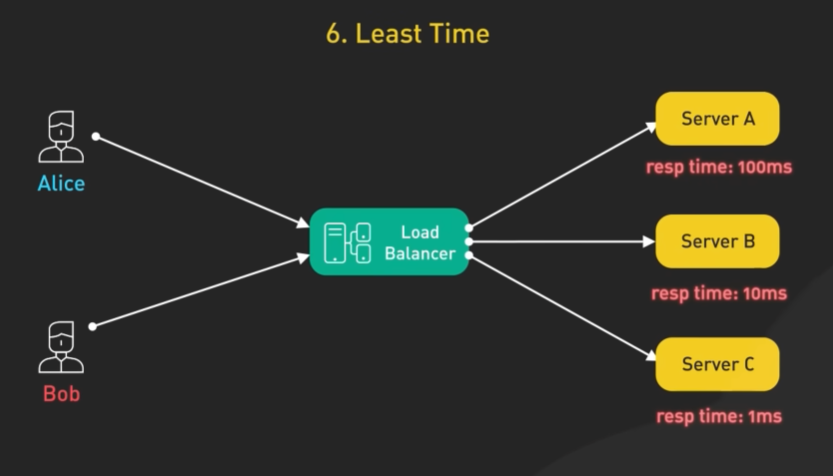
Least Response Time (Most Responsive)
This algorithm is more focused on responsiveness. The load balancer chooses the server with the lowest response time, and fewest active connections. So, it routes to the server with the lowest combination of active connections and fastest average response time. So, first it'll try sending as many requests as possible to the most responsive server, but it also takes into account the number of active connections. If Server 3 has slightly more connections but responds in 8ms versus Server 1's 45ms, Server 3 still wins. This is effective when the goal is to provide the fastest response time to requests, and you have different servers with different capabilities.The most intelligent option, used by NGINX Plus and Cloudflare.
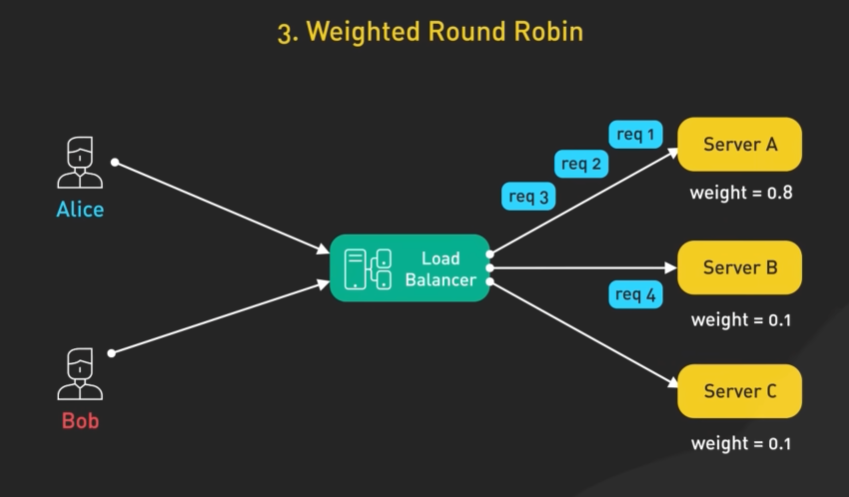
Weighted Algorithm
These are variants of any of the algorithms; round robin, least connections, least response time, IP hash, that can also be weighted for example weighted round robin, weighted least connections. In this case, servers are assigned weights based on their capacity and performance metrics. The load balancer takes that into account when redirecting traffic. First, it'll try sending as many requests to the server with the highest weight and then followed by the other servers if the one with the highest weight gets overwhelmed. A server with weight 3 gets 3 times more requests than one with weight 1. Like assigning more tables in a restaurant to experienced waiters. Use this when your servers have unequal specs. If you have a 4-core server and an 8-core server, give the 8-core double the weight.
Load balancing decides where a request goes; rate limiting decides whether it should be served at all, and production systems need both.
Monitoring Metrics
A load balancer is also a great observation point for your system's health, since all traffic flows through it.
Traffic Metrics
Tell you about volume: how much is hitting your system. RPS (requests per second) is the primary heartbeat. A sudden spike could mean a viral moment or a DDoS attack.
Performance Metrics
The most actionable for user experience. Average response time is misleading on its own. P95 and P99 tell you what the slowest 5% and 1% of users experience. If your average is 50ms but P99 is 5 seconds, something is deeply wrong for a non-trivial slice of users.
Health Metrics
The load balancer's own view of your servers. Load balancers send periodic health check requests (e.g. GET /health) and mark servers as unhealthy if they fail. Once unhealthy, traffic is stopped to that server automatically.
Error Metrics
The distinction between 4xx and 5xx is critical. 4xx (client errors) are usually application-level issues. 5xx (server errors) are infrastructure problems. A rising 5xx rate is a red alert.
Load balancers let you scale horizontally and give you redundancy. If one server crashes, traffic is automatically rerouted to the healthy ones. That is the foundation of any production system at scale.