Kylie, MCP Edition
A WhatsApp and Telegram agent whose calendar and search abilities live in a standalone MCP server, so the same server also plugs into Claude Desktop and Claude Code, with every message traced in Opik.
- Dates
- Jan 2026 to present
- Role
- Design and implementation, solo
- Status
- Live
The problem
The first version of Kylie worked. That is worth saying plainly, because the rewrite was not a rescue mission. It was a structural one. Every ability she had was custom glue code, and glue only becomes a problem once you try to grow.
What "hand-wired" actually meant
The Google Calendar tools were hand-written wrappers with hand-written schemas describing them to the language model, imported directly into the brain. Web search was a class instantiated inside a graph node. Her daily schedule was read through a direct function call. Everything worked, and everything was welded in place.
The three cracks that show up at scale
- Nothing is reusable. Want Kylie's calendar ability inside a Slack bot, or in Claude Desktop? You cannot have it. It is welded into her brain, so you would rewrite it.
- Everything is coupled. Switch from LangGraph to another framework and you rewrite every integration. Swap the model provider and you re-check every hand-written tool schema by hand.
- It does not scale. M applications multiplied by N integrations equals M times N pieces of custom glue. Every new ability makes the mess bigger, not smaller.
Note
This is the M×N problem, and MCP is the standard that dissolves it. Think of MCP as a USB-C port for AI applications: instead of custom wiring for every application-and-tool pair, the tool side exposes one standard plug and any AI application with a standard socket can use it. Build the ability once, plug it in anywhere.
There was a fourth crack too, and it had nothing to do with MCP: when something went wrong in production, all we had was a wall of print statements. That one is solved separately, by Opik, in section 06 below.
Note
New to MCP? This page covers how the protocol is used inside one real system. If you want the protocol itself explained from first principles, covering the three roles, the three primitives, JSON-RPC message shapes, the lifecycle handshake, transports and versioning, I wrote a full guide: Model Context Protocol (MCP): The USB-C Port for AI Applications.
The approach
Technical decisions
Decision 1: How capabilities reach the agent
- Chose
- A standalone MCP server, discovered at runtime
- Considered
- Hand-written tool wrappers imported into the graph (the v1 approach)
- A framework-specific tool registry such as LangChain tools
- Because
- The same server then plugs into Claude Desktop and Claude Code without a rewrite, and swapping the agent framework no longer means rewriting every integration.
Decision 2: MCP client library
- Chose
- The raw MCP Python SDK
- Considered
- A LangChain MCP adapter
- A hand-rolled JSON-RPC client
- Because
- The handshake, discovery and tool calls stay visible in the logs, which is the point of the rebuild: the protocol is the thing being demonstrated, not hidden behind an adapter.
Decision 3: Transport
- Chose
- stdio by default, Streamable HTTP behind an environment variable
- Considered
- HTTP only
- stdio only
- Because
- stdio needs no setup in development and works offline; the flag keeps the option of hosting the server remotely without touching the agent.
Decision 4: Schedule as a resource, not a tool
- Chose
- An MCP resource the application fetches and injects
- Considered
- A tool the model can call
- Because
- The schedule is context, not an action. Making it application-controlled keeps it out of the model tool budget and guarantees it is present on every turn.
Decision 5: Memory split
- Chose
- SQLite for the conversation checkpoint, Qdrant for long-term facts
- Considered
- Everything in Qdrant
- Everything in the checkpoint
- Because
- The checkpointer needs exact, ordered replay; long-term recall needs semantic search. One store cannot do both well, and the split keeps each query cheap.
Decision 6: Observability
- Chose
- Opik tracing, attached per invocation and around every MCP call
- Considered
- Print statements (the v1 approach)
- LangSmith
- Because
- Every node, model call and protocol round trip becomes an inspectable span grouped by conversation, and with no API key present the tracing code no-ops instead of failing.
Implementation
The MCP Layer
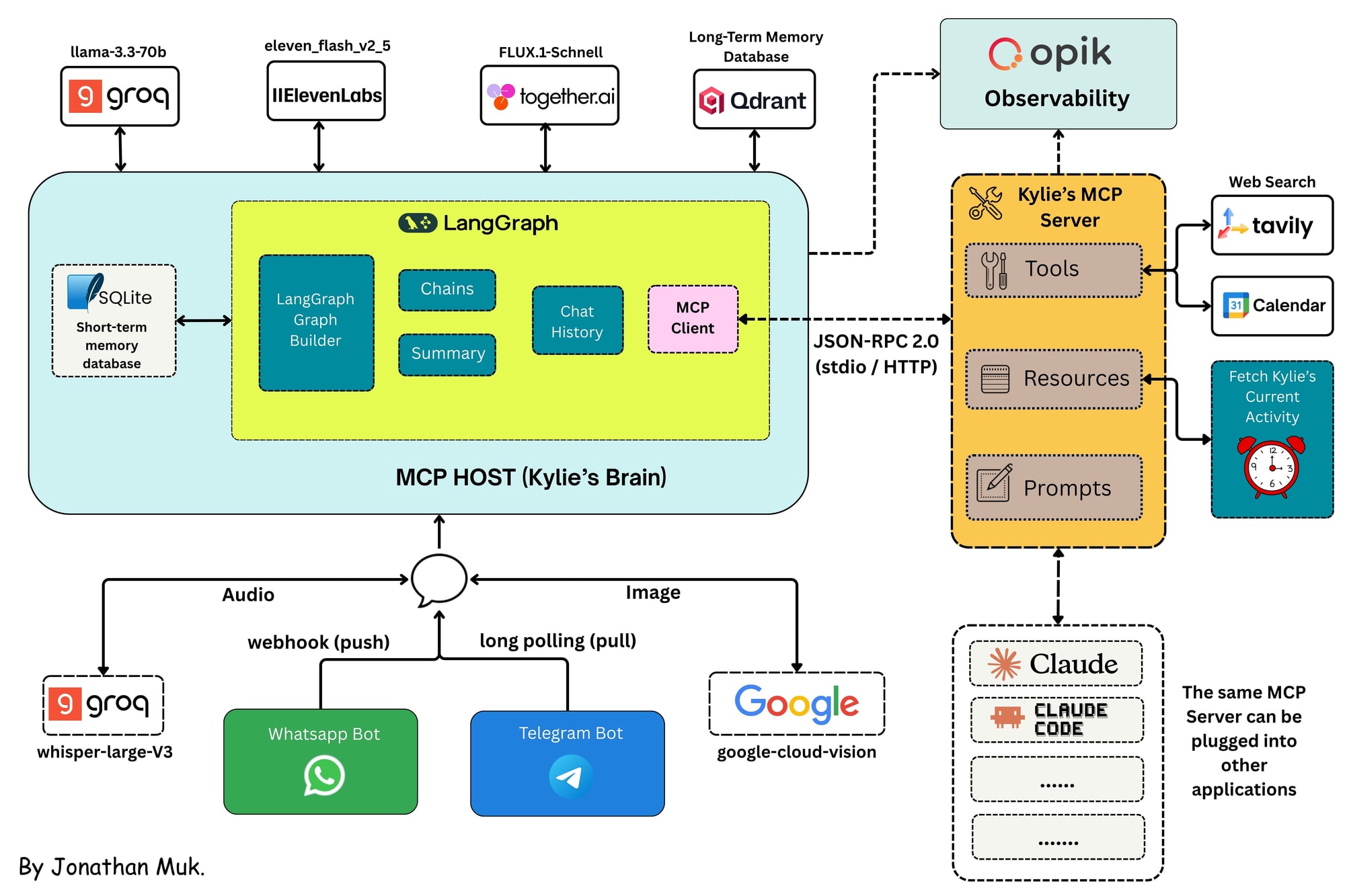
This is the headline of the whole rebuild. Everything else on this page describes what Kylie can do. This section is about how her abilities are delivered, and it is the entire difference between the first version and this one. The brain no longer contains her abilities. It discovers them.
The three roles, and where they live in this repo
Every MCP setup has exactly three roles. Mapping them onto real files is what makes the concept stop being abstract.
MCP Server
The program that has the abilities. It knows nothing about language models, LangGraph, or WhatsApp. It just describes what it can do in a standard format.
kylie_mcp/server.pyMCP Client
The connector inside the application that talks to one server. It asks "what can you do?" and later says "do this for me." Built here on the raw MCP Python SDK.
kylie_mcp/client.pyMCP Host
The actual application the user interacts with, which owns the client. For Kylie that is the FastAPI app serving both the WhatsApp webhook and the Telegram poller.
main.py
Primitive one: Tools, the things Kylie can do
Tools are model-controlled. The language model reads each tool's description and decides on its own when to call it. Kylie's server exposes four: list_upcoming_events, add_calendar_event, get_current_or_next_event and search_web. Defining one is just a decorated Python function, and the docstring is not documentation for humans, it is the text the model actually reads to decide whether this tool fits the request.
@mcp.tool()
async def add_calendar_event(
    summary: str, start_time: str, end_time: str, description: str = ""
) -> str:
    """Add a new event to the user's Google Calendar.

    Use this when the user wants to schedule something, set a reminder, or
    book time. Times without a timezone are interpreted as Africa/Kampala.
    """
    ...
Google OAuth, timezone handling and reminders all live server-side now. The brain never sees any of it. It only sees a tool name, a description, and a schema.
Primitive two: Resources, the things Kylie can read
Resources are application-controlled, which is the key distinction. The model never "calls" a resource. The application decides when to fetch it and injects it as context. Kylie's schedule, the thing that makes her feel like she is actually doing something when you message her, is exposed both as a fixed URI and as a template with a parameter.
@mcp.resource("schedule://current-activity")   # direct resource
def current_activity() -> str: ...

@mcp.resource("schedule://{day}")              # resource template (monday..sunday)
def day_schedule(day: str) -> str: ...
On the consuming side, the context injection node asks the server what Kylie is doing right now instead of calling a local function. Note the fallback: if the MCP read fails for any reason, the node quietly drops back to the local schedule generator rather than breaking the reply.
async def context_injection_node(state: AICompanionState):
    # Kylie's schedule is exposed by the MCP server as a *resource*:
    # application-controlled context that the host fetches and injects itself.
    try:
        schedule_context = await get_mcp_client().read_resource("schedule://current-activity")
    except Exception as e:
        logger.warning(f"MCP resource read failed, using local schedule instead: {e}")
        schedule_context = ScheduleContextGenerator.get_current_activity()
    ...
Primitive three: Prompts, reusable workflows
Prompts are user-controlled: reusable templates a person triggers deliberately. In hosts like Claude Code they appear as slash commands. Kylie's server ships two, plan_my_day(focus) and whats_next_briefing(), which means the same workflows are available whether you are messaging her on WhatsApp or driving the server from a developer tool.
The protocol underneath
Client and server speak JSON-RPC 2.0. When Kylie's application starts, her client performs the MCP lifecycle, and because it is a real protocol rather than glue code, you can watch it happen in the logs: capability negotiation first, then discovery, then execution on demand.
INFO kylie_mcp.client: MCP handshake complete: server=kylie v1.28.1,
     protocol=2025-11-25, capabilities: tools=True resources=True prompts=True
INFO kylie_mcp.client: MCP discovery: 4 tools (list_upcoming_events,
     add_calendar_event, get_current_or_next_event, search_web), 1 resources, 2 prompts
That is initialize (version and capability negotiation), then discovery (tools/list, resources/list, prompts/list), then later execution (tools/call, resources/read). One detail is quietly elegant here: an MCP tool's inputSchema is already JSON Schema, which is exactly the format language model APIs expect for tool definitions. So the discovered definitions are bound to the model as-is, with no translation layer in between.
Two transports, same protocol
stdio (default)
The client spawns the server as a local subprocess and the two talk over stdin and stdout, like piping text between programs in a terminal. Zero setup, ideal for development.
Streamable HTTP
Run the server anywhere and point Kylie at it with
MCP_TRANSPORT=http. Same abilities, now remote and shareable across machines.
python -m kylie_mcp.server --transport streamable-httpThe part that proves the point
Because the server speaks standard MCP and nothing about it is Kylie-specific, it is not locked to Kylie. Open the repo in Claude Code, run /mcp, and the same server that powers her calendar and search shows up there too, prompts and all, wired through a .mcp.json file. One server, many hosts. That is the M×N problem solved in practice rather than in theory.
# watch the full protocol happen step by step (handshake, discovery, calls):
python -m kylie_mcp.demo_client

# or poke the server interactively with the official MCP Inspector:
npx @modelcontextprotocol/inspector venv/Scripts/python -m kylie_mcp.server
Inside the Brain
Your brain is made of neurons. Kylie's is made of LangGraph nodes and edges: one step for pulling up memories, one for deciding what kind of reply this moment needs, one for generating images, and so on. At her core she is a graph with a state, and that state is a shared notebook every step reads from and writes to as your message travels through.
The shared notebook
Every field below is visible to every node. Because the state extends MessagesState, it also inherits messages, the full conversation history.
class AICompanionState(MessagesState):
    """State class for the AI Companion workflow."""

    summary: str            # running summary of the conversation
    workflow: str           # conversation / image / audio / tools / search
    audio_buffer: bytes     # generated voice note, waiting to be sent
    image_path: str         # generated image, waiting to be sent
    current_activity: str   # what Kylie is "doing" right now
    apply_activity: bool    # should the reply mention the activity?
    memory_context: str     # relevant long-term memories, as text
    search_results: str     # formatted web results (when search ran)
    # messages: list        # full chat history (inherited from MessagesState)
The route through the graph
One incoming message, from either channel, triggers exactly one run of the graph: memory extraction, then routing, then context injection, then memory injection, then one of five reply workflows, then summarisation only if the conversation has grown long, then done.
The router, where the decision happens
The router is a small, fast language model call with structured output. It reads only the last few messages and returns exactly one route. This is why a request for a voice note does not accidentally go through the image pipeline.
| Route | When it fires |
|---|---|
conversation | A normal text reply, the default path |
image | "show me", "send a pic of..." |
audio | "send a voice note", "say it" |
tools | Anything calendar-shaped: "what's on my schedule?", "remind me..." |
search | Anything needing fresh information: "latest news about..." |
Calling a tool, the low-level version
Here is the moment where MCP stops being architecture and becomes three lines of code. The model says it wants to call a tool with certain arguments. The client ships that over the protocol. The server does the real work against Google Calendar. The result comes back and Kylie phrases it in character. Note what is absent: no tool implementation, no schema, no API client in this file.
if hasattr(response, "tool_calls") and response.tool_calls:
    mcp_client = get_mcp_client()
    tool_messages = []

    for tool_call in response.tool_calls:
        tool_result = await mcp_client.call_tool(tool_call["name"], tool_call["args"])
        tool_messages.append(
            ToolMessage(content=str(tool_result), tool_call_id=tool_call["id"])
        )
The search node is the same shape, calling the server's search_web tool with Tavily underneath, then generating a reply grounded in the results it gets back.
One run of the graph, end to end
Both channels share a single entry point. Load the conversation where it left off, run the flowchart, save it again. The checkpointer is what makes conversations survive a restart, and that one tracer callback is what makes the entire run visible in Opik afterwards.
async def run_agent(content: str, thread_id: str, channel: str) -> dict:
    # One Opik trace per message; the thread id groups a whole conversation
    invoke_config = {"configurable": {"thread_id": thread_id}}
    tracer = get_opik_tracer(thread_id=thread_id, channel=channel)
    if tracer:
        invoke_config["callbacks"] = [tracer]

    async with AsyncSqliteSaver.from_conn_string(settings.SHORT_TERM_MEMORY_DB_PATH) as saver:
        graph = graph_builder.compile(checkpointer=saver)
        output_state = await graph.ainvoke(
            {"messages": [HumanMessage(content=content)]},
            invoke_config,
        )

    return output_state
Memory, Both Kinds
An agent without memory is exhausting to talk to. Kylie has two kinds, and the split mirrors how people actually remember each other.
Short-term: what were we just talking about?
The actual back and forth of the conversation, persisted to SQLite through the LangGraph checkpointer. Because the state extends
MessagesState, its messages list simply is the short-term memory, fed back into her prompt on every turn. Once a chat gets long, a summarisation node writes and extends a running summary and trims old messages, keeping the most recent 75. It is guarded by a conditional edge, so it only runs when the message count crosses the threshold rather than on every turn.Long-term: wait, didn't you say you're an engineer?
When you meet someone you do not memorise every sentence, you keep the key details. Kylie does the same, storing important facts as embeddings in Qdrant using all-MiniLM-L6-v2 so she can retrieve the relevant ones later rather than all of them. Two nodes make this work: extraction analyses each incoming message and stores anything worth keeping, and injection semantically searches Qdrant just before she replies and folds the matches into her character prompt.
The result is the behaviour you actually notice as a user. Tell her last week that you are an AI engineer in Kampala, mention work stress today, and she connects the two, because "AI engineer" was semantically close enough to the current topic to be retrieved.
Ears, Voice and Eyes
Real messaging is not just text. It is voice notes, screenshots and photos. Every sense below runs in both directions, which is why Kylie can answer a voice note with a voice note.
Hearing and speaking
Incoming voice notes are transcribed by Groq's
whisper-large-v3-turbo, and from that point the brain treats them exactly like text. On the way out, her written reply is synthesised by ElevenLabs (eleven_flash_v2_5), stashed in the state's audio buffer and sent back as a real voice note.Seeing and drawing
Pictures you send are described in words by Google Cloud Vision before entering the brain, so they flow through the graph as ordinary context. Going the other way, FLUX.1-schnell on Together AI generates images of what she is currently "doing", built from the conversation and her live schedule.
Thinking
Groq serves the text models:
llama-3.3-70b-versatileis the core conversational model, while the lighterllama-3.1-8b-instanthandles the fast, narrow jobs like routing and memory extraction where latency matters more than depth.
Two Doors, One Brain
Kylie has two entrances, and behind both sits the identical brain. The interesting part is that the two channels use opposite mechanics to get messages in, and that difference has real consequences for how easily someone can try her.
WhatsApp works by push
Meta calls a URL on the server every time you message her. A FastAPI endpoint receives the webhook events, handling text, audio and images. Your phone number becomes the conversation's thread id, so your chat never mixes with anyone else's, and state is checkpointed to SQLite after every message.
Telegram works by pull
Instead of exposing a URL, the application quietly asks Telegram "anything new?" in a background loop. That single difference removes a lot of friction: no public URL, no ngrok, no webhook configuration, and it works behind any firewall. Anyone who finds the bot can talk to her, which makes it the natural way to let strangers try the project.
Telegram thread ids are prefixed with tg- so the two channels never collide, voice notes and photos are handled natively on both, and both call the same run_agent() function. The brain genuinely never knows which app you texted her on.
Watching Her Work
Here is the uncomfortable truth about AI agents in production: you cannot tell what happened from the reply alone. Did the router pick the right workflow? Which tool did the model call, with what arguments? How long did the search take? Was that odd answer a bad prompt, a bad tool result, or a bad model day? Without observability you are debugging blindfolded.
What a trace contains
Every message becomes a trace in Opik, an inspectable timeline rather than a log line.
- One span per graph node, from memory extraction through routing to the reply, with timings.
- One span per language model call, with the exact prompt in, the text out, token counts and cost.
- One span per MCP call, both
mcp.tools/callandmcp.resources/read, carrying the tool name, arguments and result. - Whole conversations grouped into threads, so you can read a real exchange end to end.
How little it took to wire up
There are only two touchpoints. An OpikTracer callback attached per invocation captures every node and every model call on its own. Separately, the MCP client's call_tool and read_resource methods are wrapped with opik.track, so protocol round-trips appear as their own spans instead of hiding inside a node.
It is also opt-in and zero-risk: with no API keys present, all the tracing code no-ops and Kylie runs exactly as she would without it.
What did not work
What did not work
The first version worked, and that is worth saying plainly: the rewrite was structural, not a rescue. What did not work was everything around it. The calendar tools and web search were hand-written wrappers with hand-written schemas, imported straight into the agent brain, so nothing was reusable outside Kylie and switching framework meant rewriting every integration. Debugging was worse: when a reply came out wrong in production, all I had was a wall of print statements, with no way to tell whether the router picked the wrong workflow, the tool returned bad data or the model simply had a bad turn. Opik replaced the guesswork, and moving the capabilities behind MCP replaced the glue.
Results
What the rebuild demonstrably achieved: the capability layer is reusable, and the same server that answers Kylie also appears in Claude Code through a .mcp.json file, prompts and all. Four tools, one resource and two prompts are exposed over JSON-RPC 2.0, discovered at runtime rather than compiled in, and every message produces an inspectable Opik trace covering each graph node, each model call and each protocol round trip.
What is not measured yet: reply latency by route, cost per message, trace volume over a fixed period and the size of the Qdrant collection in production. Those numbers belong here and are deliberately absent rather than estimated.
Results at a glance
2
Messaging channels on one brain
4
MCP tools exposed over JSON-RPC
3
MCP primitives used: tools, resources, prompts
Stack
- Protocol
- MCP
- Core
- Python
- FastAPI
- LangGraph
- LangChain
- Observability
- Opik
- Memory
- Qdrant
- SQLite
- Intelligence
- Groq
- Channels
- Meta Developers
- Telegram
- Services
- Google Cloud
- Tavily
- ElevenLabs
- Together AI